
How a Small Coffee Shop Makes Its Own Screen Ads With AI
Two owners, one barista, a 43-inch TV above the counter and a vertical screen in the window. No designer, no photographer, no marketing budget. Here is how they went from one slide that hung for four months to a menu screen that changes every Monday.
This is a composite story drawn from how small businesses actually use DigiOnGo. Details are typical rather than tied to one named client, and we don't quote invented statistics.
The business
A neighbourhood coffee shop in a residential district: about 30 seats, a small pastry counter, a seasonal drinks menu that changes four or five times a year, and a weekly special the owners invent on Sunday evening. Two co-owners run it and work the bar themselves; one barista is on staff.
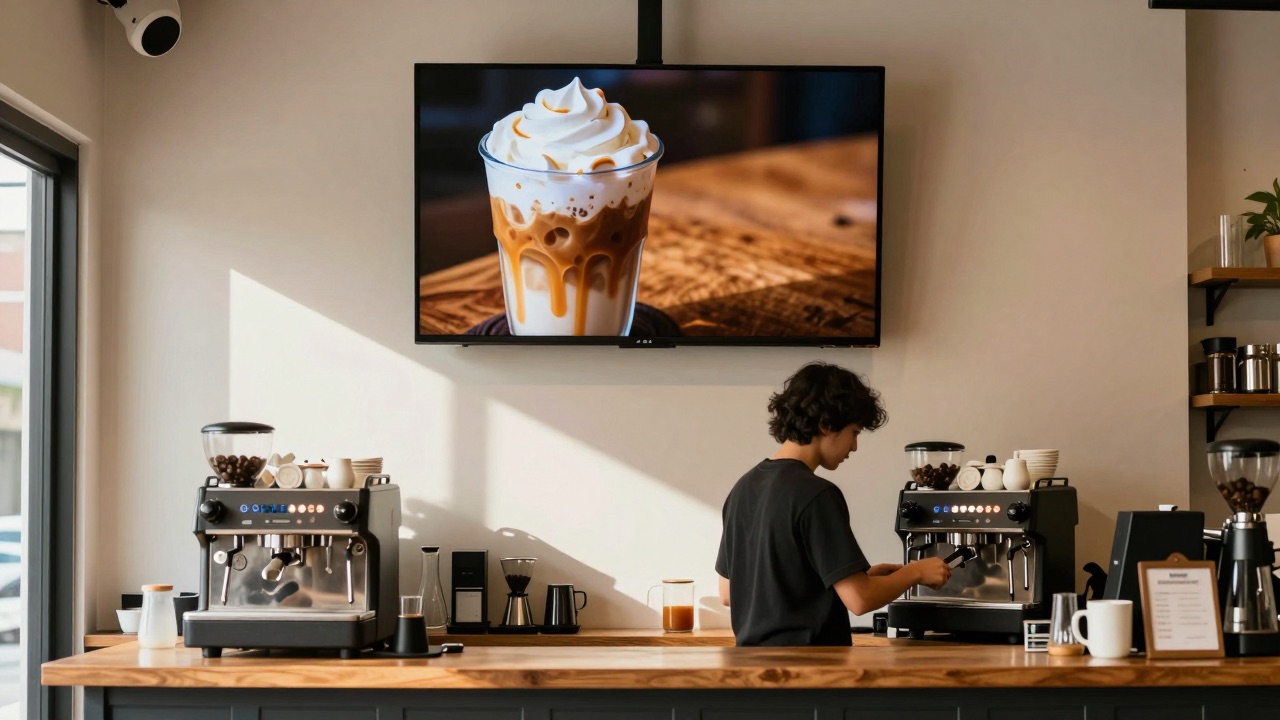
Two screens: a 43-inch TV above the counter that shows the menu and specials, and a portrait screen in the window facing the street, meant to pull people in on their way to the metro. Both run DigiOnGo on inexpensive Android TV sticks.
The problem: screens are easy, content is hard
Installing the screens took an afternoon. Feeding them turned out to be the real job. Every new drink needed a picture. Every promo needed a visual. The co-owner who "does the Instagram" was making them in a free design tool at eleven at night, using whatever stock photo was closest — which was never quite right: a different cup, a different colour of latte, a kitchen that looked nothing like theirs.
A proper photo shoot was quoted at roughly a month of the pastry counter's profit, and it would have covered the current menu only. By the time the autumn drinks arrived, the photos would be out of date. So the shoot never happened.
What they tried before
- Free stock photos — generic, obviously not their café, and the same images competitors use.
- Phone photos of the actual drinks — honest, but shot under warm bar lighting they looked muddy on a bright screen.
- A freelance designer for one campaign — good result, but every change cost money and took days.
- Leaving the screen alone — which is what actually happened for four months.
The result was a screen that showed the spring menu into July. Regulars stopped looking at it. The window screen, which was supposed to be the street-facing advertisement, ran a single loop of three slides for so long that staff joked it was wallpaper.
How it works now
When DigiOnGo added the AI Image Generator to the dashboard, the co-owner tried it on a Sunday evening with the same laptop she used for the design tool. The first usable image took about a minute, including reading the tooltip. The workflow they settled on looks like this:
Describe the drink, not the design
In the Content page they click Generate with AI and write what the picture should show: the drink, the cup, the light, the mood. No design vocabulary — "iced caramel latte in a tall glass, whipped cream, wooden counter, warm afternoon light".
Pick the screen's format
16:9 for the TV above the counter, 9:16 for the window screen. The same prompt is generated twice, once per format, so nothing is stretched or cropped.
Generate into the right folder
They keep two folders — "Menu TV" and "Window". The image lands there directly as ordinary content, with the prompt saved on it in case they want a variation later.
Add text in the playlist, publish
Drink name and price go on top as a text overlay in the playlist, not into the prompt. The playlist is already assigned to the screens, so the new slide is live in under a minute.
Prompts they actually use
The prompts are plain sentences. The trick they learned was to describe the scene as if briefing a photographer who has never seen the café.
“Iced caramel latte in a tall glass with whipped cream and caramel drizzle, wooden counter, small potted plant blurred in the background, warm afternoon sunlight, appetizing café photography”
Weekly special slide on the counter TV. The name and price are added as an overlay.
“Two golden croissants and a cinnamon roll on a rustic wooden board, a cup of cappuccino beside them, soft morning light from a window, cozy café atmosphere”
Morning loop on the window screen, 7:00–11:00, when the pastry counter is full.
“Pumpkin spice latte in a ceramic mug, cinnamon sticks and small pumpkins around it, orange autumn leaves, warm cozy light, seasonal café promotion”
Autumn menu launch — five drinks, five prompts, all generated in one sitting on a Sunday evening.
The Monday routine
Sunday evening the owners decide the week's special. Monday before opening, one of them generates two images (TV and window), drops them into the two playlists, adjusts the overlay text and publishes. The whole thing takes about fifteen minutes with coffee in hand — less than it used to take to find a stock photo that was "close enough".
Seasonal menu changes are the same routine done five times in a row. The autumn menu — five new drinks — was ready for the screens in one evening. Previously that was the point where the screen simply stayed stale.
What changed
No dramatic numbers here — a 30-seat café doesn't run A/B tests. What the owners describe is a change in how the screens are used at all.
| Before | Now |
|---|---|
| One menu slide per season, often outdated by a month or two. | A new special every week; seasonal menus on screen the day they launch. |
| Stock photos that didn't match the cups, the drinks or the room. | Images that match the prompt — their cup, their counter, their light. |
| Content work happened late at night, when someone had energy left. | Fifteen minutes on Monday morning, part of opening the shop. |
| Window screen running the same three slides for months. | Window loop refreshed with the menu; morning pastries in the morning, cold drinks in the afternoon. |
Tips that came out of it
- Describe the cup and the surface. "Tall glass" and "wooden counter" did more for consistency than any style word.
- Say what the light is. "Warm afternoon sunlight" and "soft morning light" give two different moods from the same drink.
- One drink per image. Two drinks in one prompt tend to look like a catalogue, not a special.
- Generate both formats from the same prompt — the window and the TV then feel like one campaign.
- Keep the prompt on the content card. When the special comes back next year, regenerate with a tweak instead of starting over.
Where it doesn't help
Text. The generator is not a typesetter: prices, drink names and "2 for 1" belong in the playlist overlay, where they stay crisp and editable. Asking the prompt for lettering produces something that looks like writing but isn't.
Your actual signature drink. If the brand is built on the exact look of one cup, a generated image is a stand-in, not a substitute for a real photo. The owners use generated visuals for everything seasonal and keep one real photo of their signature flat white.
Try it on your own menu screen
AI Image Generator is included in every DigiOnGo plan, including Free. Open the dashboard, go to Content and generate your first special in about a minute.
Related Articles
A Two-Chair Barbershop Fills Its Window Screen With AI Visuals
A two-chair barbershop replaced a static window poster with a vertical screen — and fills it with AI-generated visuals for services, promos and slow-hour offers.
A Small Dental Clinic Runs Calm Waiting Room Screens With AI
A three-dentist clinic replaced TV news in the waiting room with calm, on-brand AI-generated visuals and service information — no agency, no stock photos.
A Flower Shop Keeps Its Window Screen in Season With AI Visuals
A one-owner flower shop with weekly-changing stock keeps its window screen in season with AI-generated bouquets, holiday promos and delivery reminders.